
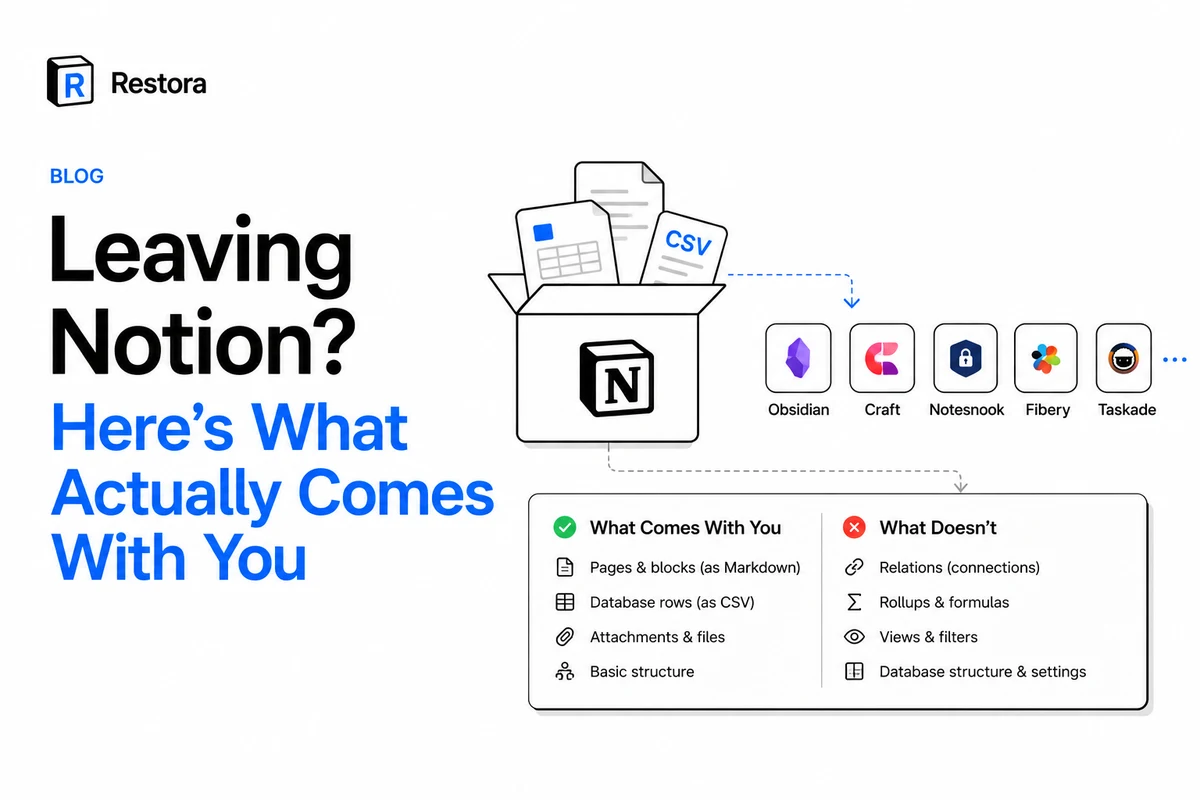
Every few months a wave of people start shopping for a way out of Notion — too slow, too much AI, a feature request that's been open for years. The destinations that come up most are Obsidian, Craft, Notesnook, Fibery, and Taskade.
Most of them don't leave. Not because they change their minds, but because two weeks in they discover what the move actually costs, and the cost isn't the new app's price. It's that a Notion database is not a document, and almost nothing on the other side knows how to receive one.
So before you pick a destination, it's worth knowing exactly what travels.
What Notion's own export gives you
Export a workspace and you get Markdown files plus a CSV per database. That sounds complete. What it quietly leaves behind:
- Relations become text. The link between Tasks and Projects turns into the linked page's name in a cell. The connection itself is gone — nothing on the other end knows it was ever a pointer.
- Rollups and formulas become frozen values. You get the number as of export time, not the thing that computed it.
- Views, filters, and sorts are dropped entirely. Every board, calendar, and filtered table you tuned simply isn't in the file.
- Comments and edit history don't come. Neither does authorship.
We went through the full list in what Notion's export contains and silently leaves behind. The short version: the export carries your content. It does not carry your system.
What survives, by destination
Here's the honest read on each common move, plus a free browser tool for it. All of these run locally on your machine — nothing is uploaded, and none of them need an account.
Obsidian
The best structural outcome available, because Obsidian has Bases and wikilinks to receive the structure. Our Notion to Obsidian converter turns each database into a Base and each relation into a [[wikilink]], so the links between pages stay live rather than collapsing to text. What you still lose: rollups and formulas (Bases compute differently), and Notion's views.
Craft, Notesnook, Bear — anything Markdown-first
These are document apps, so the documents land well and the databases don't survive as databases. Use the Notion to Markdown converter for clean files. Plan on rebuilding anything database-shaped by hand, and be honest with yourself about how much of your workspace that is before you commit.
Fibery, Taskade, Airtable — the database-shaped alternatives
These import CSV, so rows and columns arrive intact and you rebuild the relations natively on the other side. The Notion database to CSV/Excel export resolves relations to the linked page's title (rather than an unusable id) and computes rollups, which makes the rebuild far less painful than the raw export does.
Spreadsheets, or just an archive
Notion to Google Sheets for a one-time export with relations resolved and rollups computed. Notion to PDF if you want something readable and frozen for records.
The part that matters whether you leave or not
Here's the thing about threads full of people announcing they're done with a tool: most of them are still using it a year later. Not because the complaints were wrong — because leaving is expensive, and the expense is exactly what makes the complaints sting.
Which points at a different goal than migrating. The useful thing isn't to leave. It's to be able to. A workspace you could walk away from next month is a workspace you're choosing, and a pricing change or a product direction you dislike stops being something that happens to you.
That's a copy of your data, in a format that keeps the structure, on storage you control. Restora's free CLI backs up your workspace — databases as definitions, relations as relations, files as bytes — straight to your own Google Drive, S3 bucket, or a folder on your disk. The backup never passes through our servers. If you later want out, everything above starts from that file instead of from a lossy export.
If you're staying
Then the checklist is short. Keep a scheduled backup so the copy is current rather than a snapshot from the month you were annoyed. Keep it somewhere you own. And check once that you can actually open it — a backup nobody has read is a hypothesis, not a safety net.
Staying because the tool is good is fine. Staying because you can't get your data out is a different thing, and it's worth knowing which one you're doing.