
You clicked Export, got a zip file, saved it somewhere safe, and felt the small relief of a job done. That relief is mostly justified for your text. It is not justified for your databases.
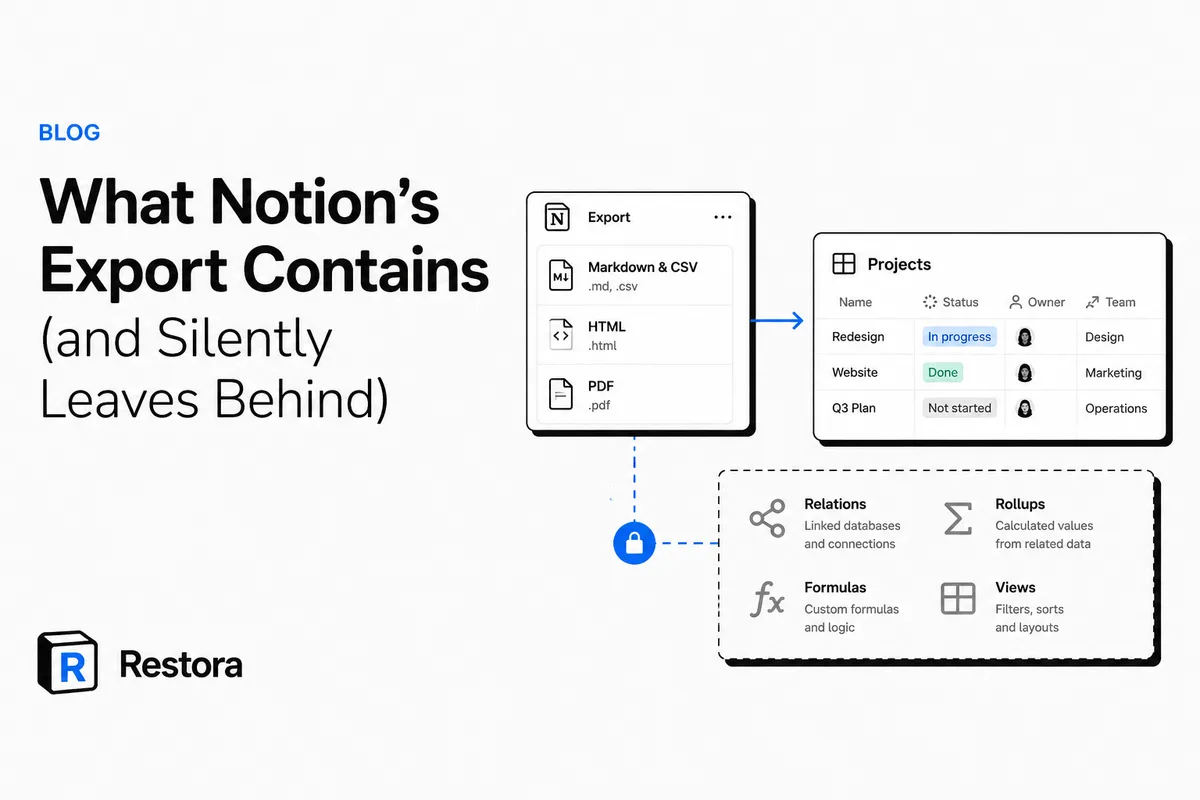
Here is the uncomfortable part nobody tells you at export time — and it's the core of Notion export limitations: relations and the rest of the connective tissue (rollups, formulas, views) that make a Notion database more than a spreadsheet are silently left behind. Export saves what a reader sees, not what the workspace is. No warning. No asterisk. Just a clean-looking zip that quietly isn't a backup you can rebuild from.
This isn't a knock on Notion. Export was designed to move content out, not to snapshot structure for restoration. But if you're treating export as your disaster plan, you should know exactly what's in the box.
What Notion's export actually contains
Notion offers three export formats from the workspace or page menu. Each one preserves a different slice of reality:
- Markdown & CSV — page bodies become
.mdfiles; each database becomes a flat.csv(plus a Markdown file per row if you include subpages). This is the format most people use for "backups." - HTML — a browsable snapshot with basic styling and links between exported pages. Good for reading offline, not for rebuilding.
- PDF — a frozen, print-style document. A record, not a data source.
For plain page content — headings, paragraphs, lists, toggles, images embedded in the page — Markdown and HTML do a genuinely decent job. If all you want is a readable archive of your notes, that's a legitimate use, and it's free.
What gets silently left behind
The gap shows up the moment a database is involved. A CSV is a grid of cells — it has no vocabulary for the things that make Notion databases powerful. Here's what quietly disappears:
Relations become text, or nothing
A relation links a row in one database to rows in another — Tasks to Projects, Invoices to Clients. In a CSV, that live link collapses into either the plain title text of the related page or, in some cases, a raw internal page ID. Either way, it's no longer a connection. Re-import the CSV and Notion creates a new text column. It does not look up the other database and reconnect anything. The web of relationships that made your workspace navigable is gone.
Rollups and formulas export as frozen values
A rollup ("total hours across related tasks") and a formula ("days until due") are computed from other data. Export captures the number you happened to see at export time — not the definition that produced it. On re-import, that column is dead text. It won't recalculate, because the formula and the relation it depended on no longer exist. You've saved the answer and thrown away the question.
Views, filters, and sorts don't exist in the file at all
Every board, calendar, timeline, gallery, grouped view, saved filter, and sort order lives in Notion's structure — not in your rows. CSV has no concept of a Kanban board. So none of it is in the export. Rebuild from a CSV and you get one raw table with zero of the views your team actually worked in. For most teams, the views are the workflow.
Comments, history, and permissions are out of scope
Inline comments, discussion threads, edit history, and who-can-see-what permissions aren't in a Markdown or CSV export. They're workspace metadata, and export doesn't touch them.
| What you'd need to rebuild | Notion Markdown/CSV export | Restora backup + restore |
|---|---|---|
| Page text & basic blocks | Yes | Yes |
| Database rows & property values | Yes (flat) | Yes |
| Relations (live links between databases) | No — become text or raw IDs | Yes — reconnected |
| Rollups | No — frozen value only | Yes — recomputed |
| Formulas | No — frozen value only | Yes — recomputed |
| Views, filters, sorts | No — absent entirely | Yes — restored |
| Attachments in rows | Files download, links to internal pages break | Yes (up to 20MB (150MB on Restora Pro)/file) |
| Re-import reconnects structure | No | Yes |
Why "just re-import the CSV" doesn't save you
This is the trap that catches careful people. You did export. You have the files. Then the day comes — an accidental delete, a botched property change, a departed teammate who nuked a database — and you drag the CSV back into Notion expecting your workspace to reappear.
What you get is a fresh database of flat rows. Notion imports a CSV as a brand-new table. It does not scan your other databases to rematch relations. It does not recreate formula or rollup definitions. It does not rebuild a single view. You're now doing archaeology by hand: recreating property types, manually re-linking hundreds of relations, rewriting every formula, and rebuilding every board and filter from memory. For a workspace of any real size, that's days of work — and it's rarely fully recoverable, because the information needed to reconnect it was never in the export to begin with.
Notion's own documentation says the same thing in fewer words: a new CSV import can't create relations, rollups or formulas, and you can't instantly recreate your workspace by re-uploading an export.
Property types make this worse. If a Select silently became Text somewhere along the way, the export just records text — see why Notion property type changes are permanent. And export can't help you at all with data that already fell out of Notion's 30-day trash — that's covered in Notion's version history and trash limits.
When export is the right tool — and when it isn't
Be honest about the job. If you want a clean, readable, one-file archive of your content — say, to keep a copy of your notes in a folder or move text into another app — Notion's export is fine, and free tools make it cleaner:
- For tidy Markdown of a page or workspace, use Notion to Markdown.
- For flat database rows as a spreadsheet, use Notion backup to CSV.
Those are the correct tools for archiving text. They will not rebuild a database, because that was never their job.
If instead you want a backup you can actually restore — one that rebuilds your databases inside Notion with relations reconnected, rollups and formulas recomputed, and views and filters back in place — that's a different class of tool. That's what Restora does. Backing up is free forever, to your own Google Drive, any S3-compatible bucket, or a local folder — your backups aren't stored on our servers. You pay only when you need to restore.
The honest limits — stated plainly
No backup tool can bend physics, so here's the truth:
- A restore creates new Notion page IDs, which means edit history and authorship reset, and page comments come back as new comments with the original author named. Your data and structure come back; the timeline of who-typed-what does not.
- A backup only protects what you actually backed up — it can't recover something you never captured.
- Once Notion's 30-day trash empties, nothing can bring that data back. Protection has to start before the loss.
Export answers "what did this look like?" A restorable backup answers "can I get my workspace back?" Only one of those is a disaster plan.
Keep exporting for archives — it's a fine habit. Just don't mistake the photograph for the blueprint. The structure that export leaves behind is precisely the structure you'll be desperate for on the worst day.