
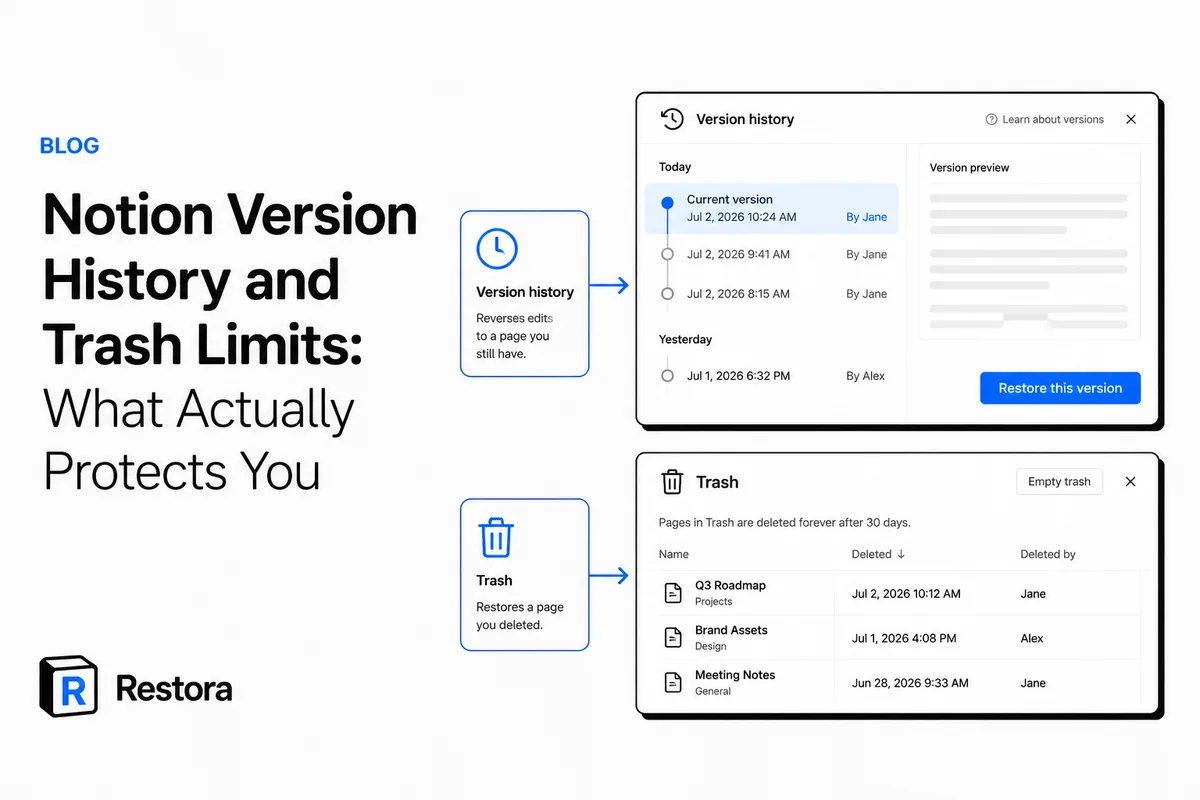
The short answer: Notion keeps version history for 7 days on Free, 30 days on Plus, 90 days on Business and without limit on Enterprise, and it keeps deleted pages in Trash for 30 days by default on every plan. Here's what each one can actually restore, and where both stop.
Two safety nets, and what they actually do
Understanding Notion version history and trash limits is the difference between a five-minute recovery and losing a page for good. They are two separate features that people tend to blur together, and each one covers a different kind of mistake. Neither is a backup, and both have edges you only discover when you're already in trouble.
Version history reverses edits to a page you still have. Trash restores a page you deleted. If you understand which one applies to your situation, you stop wasting time in the wrong menu while the clock is running.
Version history: reverses edits, not deletions
Every Notion page keeps a timeline of past versions. Open a page, use the page menu, and you can browse snapshots and restore an earlier one. This is what saves you after a bad paste, an overwritten paragraph, or a formatting change you want to undo hours later.
The catch is retention. How far back you can go depends on your plan. Per Notion's help center, checked in September 2026:
| Notion plan | Version history | Trash |
|---|---|---|
| Free | 7 days | 30 days |
| Plus | 30 days | 30 days |
| Business | 90 days | 30 days |
| Enterprise | Unlimited | 30 days by default; workspace owners can change it |
Notion adjusts these numbers from time to time, so treat the table as a snapshot. The practical takeaway doesn't change: on most plans, version history is a short-to-medium window, not an archive. If you notice a problem weeks later on Free or Plus, the snapshot you need may already be gone.
Version history is per-page. If a whole page or database is deleted, there's no page left to open a version timeline on — that's a trash problem, covered next.
Where version history quietly fails you
- Database rows are pages too. Each row has its own history, but you restore them one at a time. Fine for one row, painful across hundreds.
- Automations and edits overwrite silently. A synced value or a bulk edit that rewrites a property leaves the new value as the current state. You can still step back through that page's history, but nothing flags that it happened.
- Retention runs out. The snapshot you need has to still exist. On lower plans, that window is short.
Trash: restores deletions, on a strict clock
When you delete a page, it moves to Trash instead of vanishing. You can open Trash from the sidebar, search it, and restore a page to where it lived. This is your recovery path for accidental deletions — a page dragged to the wrong place, a workspace cleanup that went too far.
The hard limit: Trash keeps deleted pages for 30 days by default, then deletes them permanently. After that there's no version history to open, and the last resort is Notion support, which Notion says can restore a snapshot from the past 30 days. This is the single most common way people permanently lose Notion data: they assume it's recoverable, and by the time they look, the 30-day window has closed.
Deleted database rows vs. overwritten rows
This distinction trips people up, so be precise about it:
- Deleted rows go to the trash as pages. A row you delete becomes a trashed page and can be restored individually — doable for one, painful at scale when you've lost dozens or hundreds.
- Overwritten rows do not. A row whose values were changed by an edit or an automation was never deleted, so it isn't in the trash at all. The old values live only in that page's version history — until retention expires.
Practical rule: trash is for things you removed. Version history is for things you changed. If an automation quietly rewrote a field, trash won't help you — go to the row's history, and go before it ages out.
| Situation | Version history | Trash |
|---|---|---|
| Overwrote a paragraph | Yes, if within retention | No |
| Deleted a whole page | No | Yes, within ~30 days |
| Automation rewrote a property | Yes, per page, within retention | No |
| Deleted 200 database rows | No | Yes, but one at a time |
| Trash already emptied | No | No |
The gap both features leave open
Put the two together and the shape of the gap is clear. Version history protects recent edits on pages you still have, for as long as your plan retains them. Trash protects deletions, for about 30 days. Outside those windows — an old snapshot that expired, a trash that was emptied, a workspace that was deleted or one you lost access to — Notion has little or nothing to give you back.
That's not a flaw to complain about; it's just the boundary of built-in tooling. The fix is an independent copy that lives on your own storage and doesn't age out on someone else's clock.
1. Don't rely on retention you don't control
Both safety nets run on Notion's clock, not yours. If your recovery plan is "it'll be in version history" or "I can pull it from trash," you're betting on a window you can't extend and a retention setting that can change. An independent backup is the only copy whose lifespan you decide.
2. Know sooner when something's gone
The 30-day trash window only helps if you notice in time. This is where deletion alerts earn their place: as a Pro capability, Restora can send near-real-time deletion warnings so a page removed by accident or automation doesn't sit unnoticed until the trash empties. It's a heads-up, not magic — but a heads-up on day one beats discovering the loss on day 31.
3. Restore, not just export
A backup is only as good as its restore, and rebuilding a Notion workspace properly — relations, rollups, views — is the hard part. See exactly what a plain Notion export leaves behind and what a real restore has to put back.
A simple protection routine
- Treat version history as a short window. If you spot a bad edit, fix it now rather than assuming the snapshot will wait.
- Treat trash as a 30-day countdown. Empty it deliberately, and check it the moment you suspect something's missing.
- Keep one independent copy. Back up to storage you own so nothing depends on Notion's retention clock.
Do those three and the built-in tools stop being your only line of defense. Related reading: how to change a Notion property type without losing data.
Version history and trash are good at what they do. They just weren't built to be your backup — and they quietly stop helping right when you need them most.