
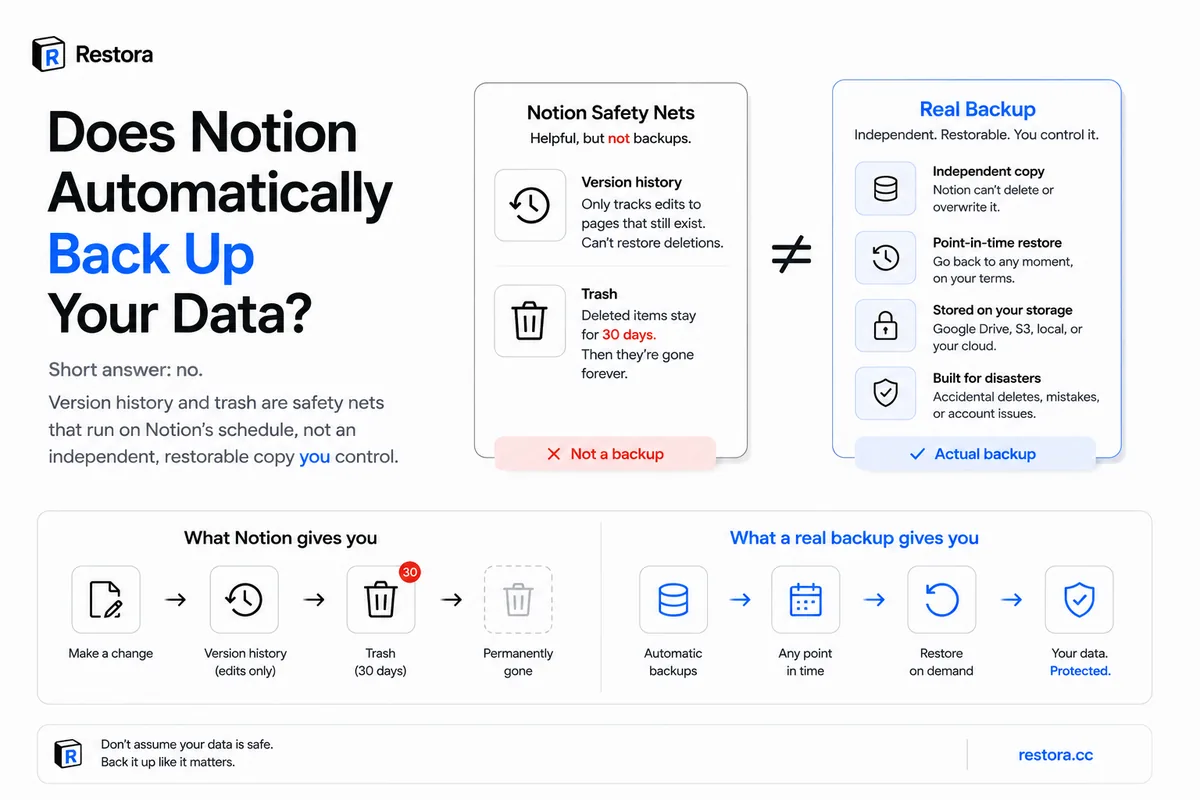
Yes — Notion saves automatically. There's no save button: your edits are stored in Notion's cloud as you work, and Notion's help center says it keeps per-minute backups of page content on its servers. So the question worth asking isn't whether Notion saved your work. It's whether you can get it back yourself when something goes wrong — and that's where autosave stops helping.
You change your mind about deleting a project database, open Notion's trash to pull it back, and the page you need is already gone. So you go looking for the automatic backup you assumed was quietly running in the background. There isn't one.
No — Notion does not give you an automatic, restorable backup in the sense most people mean: an independent copy of your workspace, on storage you control, that you can roll back to on demand. Notion ships safety nets, and safety nets are not backups.
What Notion actually gives you
Two features get mistaken for backup. Both run on Notion's clock, not yours.
Version history reverses edits on a page you still have. It's per-page undo, and how far back you can reach depends on your plan: 7 days on Free, 30 on Plus, 90 on Business and unlimited on Enterprise, per Notion's help center. It cannot help with a page that no longer exists.
Trash restores a page you deleted, but only for a while. Trash keeps deleted pages for 30 days by default. After that they're deleted for good — Notion says its support team can restore a snapshot from the past 30 days on request, but that's Notion's recovery, on Notion's timeline, not a copy you hold. A deleted database row lands in trash as a page you can restore one at a time, which is miserable across hundreds of rows. A row that was overwritten by an edit or an automation was never deleted, so it isn't in trash at all — its old values live only in that page's version history until retention runs out.
| Feature | What it does | The catch |
|---|---|---|
| Version history | Reverses edits on a page you still have | Retention depends on your plan; per-page only |
| Trash | Restores a page you deleted | Emptied after 30 days by default, then gone for good |
| Notion support | Restores a snapshot from the past 30 days, on request | On Notion's timeline; nothing older |
| Real automatic backup | Independent copy you can restore on demand | Notion doesn't ship one; you set it up |
This isn't a knock on Notion. Both tools are good at the everyday save: "I pasted over the wrong cell," "I trashed that yesterday by accident." They're just not disaster recovery, and they were never built to be. For the full mechanics and where each one quietly stops helping, see Notion version history and trash limits.
What "automatic backup" would actually require
Call something a backup only if it does three things:
- Independent copy. It lives outside Notion, on storage you own, so a mistake inside Notion can't reach it.
- Restorable. You can rebuild the database, not just read a frozen text dump of it.
- Runs on a schedule you control. It happens whether or not you remember to trigger it.
Version history and trash fail all three. They live inside Notion, they answer to Notion's timers, and neither hands you a copy you actually hold.
But don't admins get workspace exports?
On higher plans, admins can trigger a workspace-level export. That's real, and it's useful, but it's still an export, not a restore. Markdown, CSV, HTML, and PDF save your page text and flat rows while dropping relations (they collapse to plain titles or raw IDs), rollups and formulas (only the frozen value survives), and views, filters, and sorts (gone entirely). Re-importing a CSV creates a brand-new table; it does not reconnect relations, recompute formulas, or rebuild your views. There's no one-click "restore my workspace to Tuesday" button in that flow. The full list of what disappears is in what Notion's export leaves behind.
To get a real automatic backup, you set one up
The good news: it can be free. Automated backups with Restora copy your workspace to storage you own — your Google Drive, any S3-compatible bucket, or a local folder — and no copy is kept on Restora's servers. Backing up is free forever; you only pay if you ever need to restore. Schedule it once from the CLI:
restora schedule --daily 09:00
When you restore, Restora rebuilds databases inside Notion with relations reconnected, rollups and formulas recomputed, and views restored — the structure a plain export throws away.
One honest caveat, because trust is the whole point: a restore creates new Notion pages, so edit history and creation timestamps reset to the moment you restore, and page comments come back as new comments with the original author named. A backup can only bring back what it actually captured, and nothing recovers data that has left Notion's Trash and aged past its 30-day support window. That's the real lesson: protection has to start before the loss, not after you go looking for a backup that was never running.