
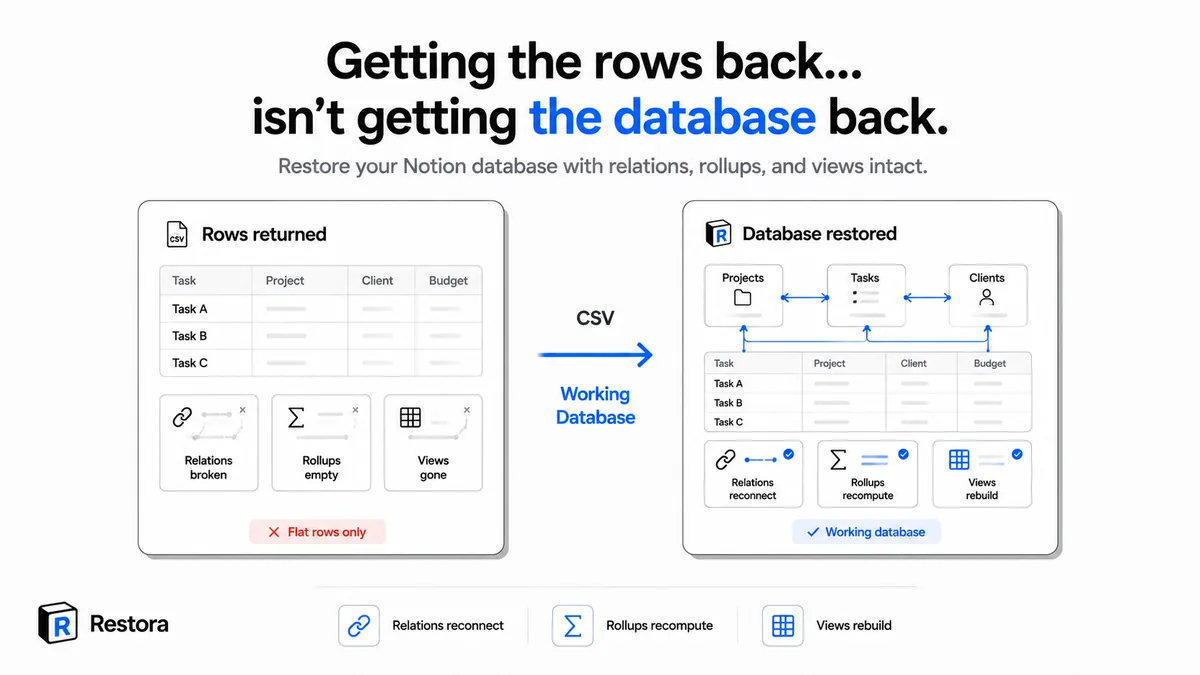
At some point Notion stopped being folders full of pages and became a system. You linked Tasks to Projects, Projects to Clients, meeting notes to the people who were actually in the room. Now one view pulls all of it together without copying anything anywhere, and you can answer "who said what, in which meeting, about which project" in about two clicks. That's the moment Notion clicks for most people — not the note-taking, the wiring.
And that wiring is not your rows. It's the relations pointing pages at each other, the rollups counting across them, the formulas, and the filtered views that make each project page show exactly the right slice of everything else. The rows are the cheapest part to replace. The system is the expensive part.
Which is what makes the obvious fix such a letdown. You export the database to CSV, you re-import it, and Notion hands you a fresh flat table: relation columns are plain text now, rollups show nothing, and the views, filters, and sorts you tuned over weeks are gone. Your rows came back. Your system didn't — and rebuilding it means clicking every relation into place by hand, retyping every formula, and recreating every view from memory.
Getting that system back, wired, is the one job Restora is built for. Here's how it works — including the parts it can't bring back.
First: you can only restore what you backed up
A restore is not a recovery spell. It rebuilds from a snapshot you captured earlier. If the database was never backed up, there is nothing to rebuild from, and no tool — Restora included — can invent the relations that existed before. So step zero is a backup: back up your workspace free before you need any of this — or, if one database is what matters, back up that database and the ones it links to. Backing up is free forever and goes to storage you own (your own Google Drive, an S3-compatible bucket, or a local folder). You pay only when you actually need to restore.
Already lost the data and never had a backup? Then this guide isn't your fix yet. Start with recovering a deleted Notion page and check whether it's still in Notion's trash. Trash keeps deleted content for 30 days by default, and Notion says its support team can restore a snapshot from the past 30 days; after that, it's gone for good.
How to restore a Notion database with relations intact
Assuming you have a backup, the flow is short. Restora does the wiring; you make the decisions.
- Open Restora and pick the snapshot. Sign in at app.restora.cc and point Restora at the backup you want to restore from. If you've been running scheduled backups, you'll have several snapshots. Pick the one from before the loss, not after it. Restoring from a snapshot that already contains the damage just rebuilds the damage.
- Choose what to restore. You rarely need the whole workspace. Restora lets you restore an entire workspace, a single database, or just the rows that were deleted. If one database got wrecked by a bad automation, restore just that database and leave everything else untouched.
- Name the restored container. Give the restored copy a name you'll recognize, like "Projects (restored 2026-07-11)." Clear naming means you can compare the old and new side by side and copy over exactly what you need, instead of squinting at two databases with the same title trying to work out which is which.
- Run the restore. This is where the manual work disappears. Restora recreates the databases, reconnects the relations between them, recomputes rollups and formulas, and restores your views, filters, and sorts. Row attachments come back too, up to your plan's capture cap (20MB Free / 150MB Pro) — note a free destination Notion workspace accepts uploads up to 5MB (Notion's plan limit). You can walk through the full sequence in the restore walkthrough.
- Verify it. Open two or three databases and spot-check. Do the relation cells point at real linked pages instead of bare text? Do the rollups show numbers instead of blanks? Restora also runs a restore-verification step that checks the rebuilt links resolved, so you get a "verified restorable" signal rather than a hope. Treat that as a strong check, not magic. Open the databases you care about most and confirm with your own eyes.
What a restore can't bring back
Restora rebuilds the structure honestly, which means being honest about what a rebuild is. A restore creates new pages in Notion, and new pages come with new page IDs. A few things reset as a result, and no backup tool can avoid this:
- Edit history, timestamps and authorship reset. The rebuilt pages are new, so their version history starts at the restore time, comments come back as new comments with the original author named, and "created by / created at" reflect the restore rather than the original. The data is back; its paper trail is not.
- Embedded databases come back as links. If a database was embedded inline on a dashboard page, Notion's API can't re-embed it in that exact spot. It returns as a fully rebuilt database that the dashboard links to, not an inline view. The data and structure are intact; only the embed location changes.
- You can't restore what wasn't captured. A restore reflects the snapshot exactly. Anything added after that backup ran isn't in it, and anything Notion already purged from its emptied trash is gone before any backup could reach it. This is the whole argument for backing up on a schedule instead of once.
None of this is a knock on Notion. Version history and trash are genuinely useful for the cases they cover: reverting edits on a page you still have, or undeleting one inside the trash window. How far back each reaches depends on your plan: version history lasts 7 days on Free and up to 90 on Business (unlimited on Enterprise), and Trash empties after 30 days by default, so they cover recent slips, not old ones. What they don't do is rebuild a database's relations and rollups, and they don't reach past their own cutoff. For the exact boundaries, see what version history and trash actually protect.
Hand-rebuild from CSV vs. restore with Restora
Here's the same recovery done two ways. A CSV re-import gets your rows back and stops there; everything structural is manual. That isn't Restora's opinion of the export format — it's what Notion's own export drops on the way out, which is a longer list than most people expect.
| What you need back | Hand-rebuild from CSV | Restore with Restora |
|---|---|---|
| Rows and cell values | Yes, but flat | Yes |
| Relations between databases | Lost; collapse to plain text, reconnect every link by hand | Reconnected automatically |
| Rollups and formulas | Only the frozen value; retype every formula | Recomputed |
| Views, filters, sorts | Gone; rebuild from memory | Restored |
| Time to a working database | Hours to days for a linked DB | One restore run |
The rows were never the hard part. Relations, rollups, and views are what take a Notion database from "some data in a table" to something your team actually runs on, and they're exactly what a manual recovery can't hand back cleanly. The catch is that a restore is only ever as good as the snapshot behind it. So if you take one thing from this: the moment to protect a database is before something happens to it, not the morning after. Back up now, and the next time an automation misfires or a page vanishes, restoring is a run, not a reconstruction.